
Reporting
Reporting and surveys in Pluss
Community Manager shows how many residents use the app and what they open. Surveys and live polls ask them what they think.
Every chart and every survey result exports to CSV.
Engagement
Who uses the app, and what they open
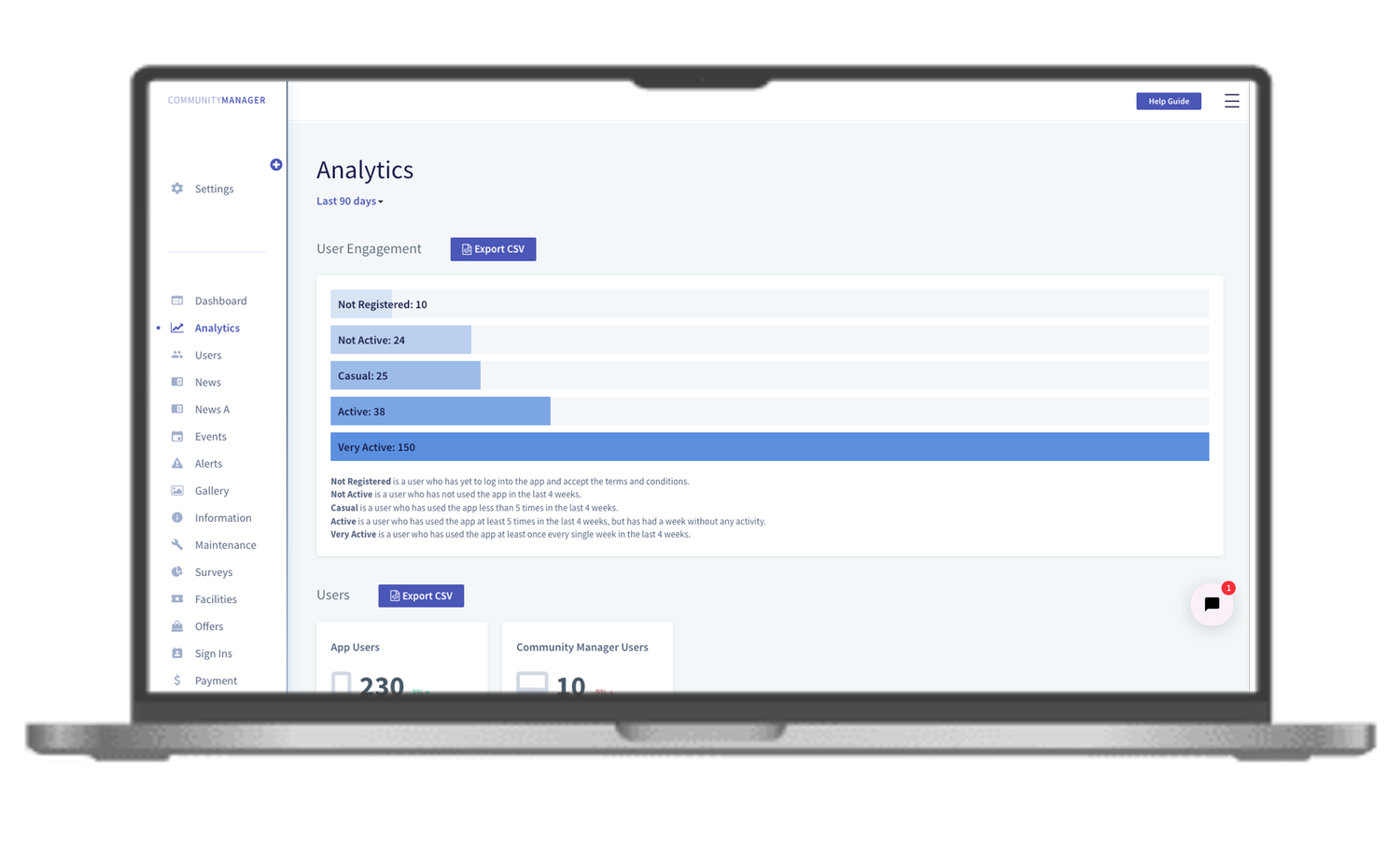
The user engagement chart sorts every member into five groups, from Not Registered to Very Active. It's based on how often each person used the app in the last four weeks.
A large Not Registered group is a prompt to send a welcome email or run a re-engagement campaign.
- Filter by period, by user category and by user type. Categories are staff, primary users such as residents, and linked users such as family.
- Summary cards show totals for news, alerts and events, with the change against the previous 90 days.
- Open any metric as a graph, grouped by week.
- Export any section to CSV, with the columns you choose.
See page views and reactions for each news post, and page views and bookings for each event.
Pluss HQ compares engagement, user activity and content across your communities in one dashboard. Filter by site, by period and by user type.
Feedback from residents
Surveys and live polls
Build a survey in Community Manager
- Ask multiple choice, checkbox, 1 to 5 scale and written answer questions.
- Collect answers anonymously if you choose.
- Set the audience, the start and close dates, and a notification.
- Let residents see the results, if you choose.
- Export the results to CSV.
A live poll at a residents' meeting
- Ask a multiple choice or a 1 to 5 scale question.
- Start the poll when the meeting reaches it.
- An embed link shows the results live on the big screen or in a presentation.
- End the poll when you're ready.
Customers
Figures from Pluss communities
These figures come from the customers or from the Pluss community data project.
Median share of residents active each month, across 21 communities.
Weekly engagement at Ozcare, Reflections on the Bay, within 90 days of launch.
Weekly engagement at Kokoda Residences.
Weekly homeowner engagement at GemLife.
Pricing
How Pluss is priced
Pluss is priced per property: each apartment, villa or unit in a village, each home in a land lease community and each room in an aged care home. There is no charge for staff or family users.
Every feature is included. There are no feature tiers and no fee per login. Pluss HQ is an add-on for operators with several communities.
Questions
Questions about reporting in Pluss
What counts as an active resident?
Pluss sorts members by how often they used the app in the last four weeks, from Not Registered to Very Active. Each group is defined on screen under the chart.
Can we export the data?
Yes. Export any section of the analytics dashboard, and any survey's results, to CSV.
Can we compare our communities?
Yes, with Pluss HQ. It compares engagement, user activity and content across your communities in one dashboard.
Can surveys be anonymous?
Yes. Choose anonymous responses when you set up the survey.
Can residents see survey results?
If you allow it. Each survey has a setting that lets the people who answered see the results.
Can we see family use separately?
Yes. Filter by user category: staff, primary users such as residents, or linked users such as family.
Book a 30 minute demo
See the engagement dashboard for a demo community, and how a survey is built and answered.